> For the complete documentation index, see [llms.txt](https://oranthemes.gitbook.io/edge-theme/llms.txt). Markdown versions of documentation pages are available by appending `.md` to page URLs; this page is available as [Markdown](https://oranthemes.gitbook.io/edge-theme/collections-and-products-pages/collection-page/collection-banner.md).

# Collection banner

<figure><img src="https://2841038207-files.gitbook.io/~/files/v0/b/gitbook-x-prod.appspot.com/o/spaces%2FIGTidUfSjAqopf8pRRmN%2Fuploads%2F4vSx8pME1FQZiRUv4d4O%2F2025-04-05_13-03-34.jpg?alt=media&amp;token=659f6da6-81d4-4315-9e12-09f48dde2f20" alt=""><figcaption></figcaption></figure>

{% hint style="success" %}
**Steps:**

1. In the theme editor (**Customize**), open the template selector.
2. Select **Collections**, then **Collection banner.**
3. On the left-sidebar, add **Collection banner.**
4. Make necessary changes > **Save.**
   {% endhint %}

## General settings

<div><figure><img src="https://2841038207-files.gitbook.io/~/files/v0/b/gitbook-x-prod.appspot.com/o/spaces%2FIGTidUfSjAqopf8pRRmN%2Fuploads%2FSdHblSlEZ50QSmeMZqQb%2F2025-04-05_13-04-05.jpg?alt=media&amp;token=4d5e4e53-4434-4f77-88e3-783134c14f5b" alt=""><figcaption></figcaption></figure> <figure><img src="https://2841038207-files.gitbook.io/~/files/v0/b/gitbook-x-prod.appspot.com/o/spaces%2FIGTidUfSjAqopf8pRRmN%2Fuploads%2FhMiEYtw3iuI8dkax10g1%2F2025-04-05_13-04-33.jpg?alt=media&amp;token=39304dce-8089-4bf3-8b24-e4d8a81a37c7" alt=""><figcaption></figcaption></figure></div>

Add a description or image by editing your collection. [Learn more](https://help.shopify.com/manual/products/collections/collection-layout)

* **Show breadcrumb**&#x20;
* **Show collection title**
* **Show collection description**
* **Show collection image**
* **Collection title size** - Fromd heading 1 - heading 6
* **Image size** -  Adapt to image / Small / Medium / Large
* **Image** - Default to collection image.
* **Align content** - Left / Center / Right

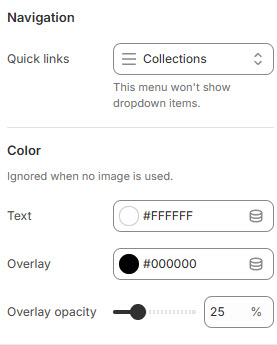
### Navigation

* Quick links - Select menu navigation

### Color

> Ignored when no image is used.

* Text color
* Overlay color
* Overlay opacity